
Download Diabetes Pilot – Comprehensive Mac Health Tool for Diabetes Management
Overview of Diabetes Pilot
Diabetes Pilot is a dedicated health‑focused application built exclusively for macOS. Designed for individuals, caregivers, and health‑professionals who need a reliable, science‑backed platform to monitor, analyze, and manage diabetes data, the software blends intuitive visualizations with powerful analytics. Launched in 2016 and continuously updated until its latest release (version 1.4.3) on December 21 2016, Diabetes Pilot offers a full‑version experience without hidden modules or trial limitations. Although its download numbers are modest—reflecting its niche audience—the program has earned a reputation for precision, data security, and an uncluttered user interface that aligns with Apple’s design principles. Whether you’re tracking blood glucose trends, calculating insulin dosages, or generating printable reports for your physician, Diabetes Pilot delivers a seamless macOS experience in English, making it an essential addition to any diabetes‑care toolkit.
The application falls under the “Science & Education” category with a subcategory of “Health,” emphasizing its educational value as well as its practical utility. By centralizing all diabetes‑related metrics in one secure location, users can reduce the need for scattered spreadsheets, paper logs, or multiple disparate apps. The software also respects privacy regulations, storing data locally on the Mac and offering optional encrypted backups for peace of mind. Its clean dashboard, customizable charts, and built‑in alerts help users stay proactive, turning raw numbers into actionable insights that can improve day‑to‑day glucose control.
For anyone who prefers a Mac‑only solution that marries scientific rigor with user‑friendly design, Diabetes Pilot stands out as a trustworthy, free‑to‑download tool. The next sections dive deeper into its core features, installation process, system requirements, and the pros and cons that real‑world users have reported.
Key Features that Set Diabetes Pilot Apart
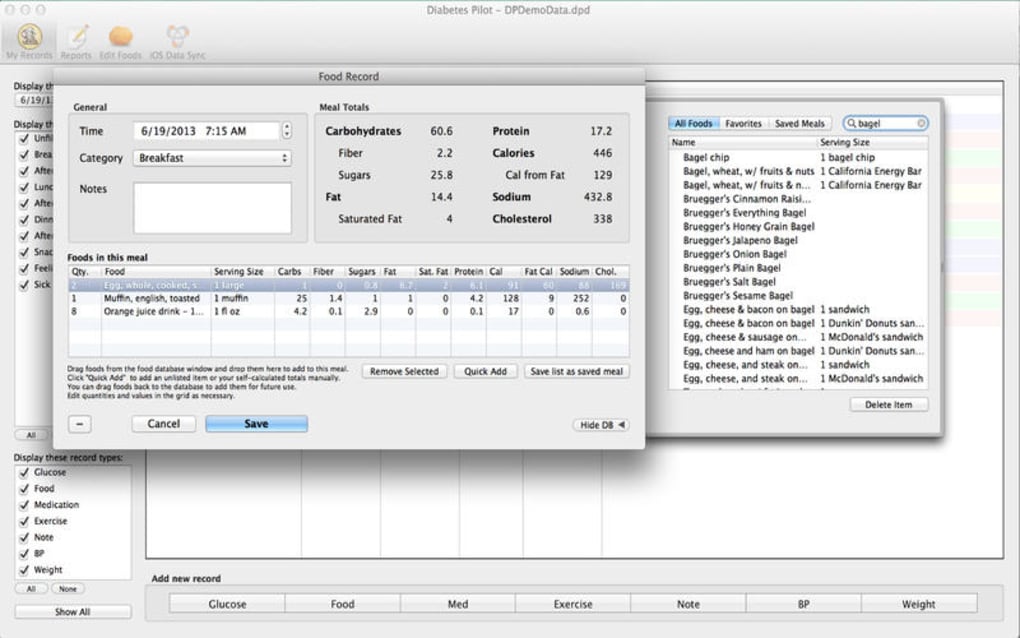
- Comprehensive Data Entry – Input blood glucose readings, HbA1c values, carbohydrate intake, insulin doses, and physical activity with customizable fields that adapt to your personal tracking preferences.
- Dynamic Graphs & Charts – Visualize trends over daily, weekly, and monthly periods using line graphs, bar charts, and scatter plots that can be filtered by time range, meal type, or medication.
- Automatic Calculations – The app automatically computes average glucose, standard deviation, time‑in‑range percentages, and insulin‑to‑carbohydrate ratios, reducing manual math errors.
- Alert & Notification System – Set threshold alerts for hypo‑ or hyper‑glycemia; receive on‑screen pop‑ups or macOS notifications when readings exceed safe limits.
- Export & Reporting Tools – Generate PDF or CSV reports that can be shared with healthcare providers, complete with annotated charts and summary statistics.
- Secure Local Storage – All data is stored on the user’s Mac, with optional AES‑256 encryption for added privacy. No cloud dependency means you retain full control over your health information.
- Customizable Dashboard – Drag‑and‑drop widgets to create a personalized home screen that highlights the metrics most important to you, such as fasting glucose or post‑meal spikes.
- Multi‑Device Sync (Optional) – While the core app is Mac‑only, an optional iCloud‑based sync module lets you view read‑only snapshots on iPhone or iPad, ensuring continuity across Apple devices.
- Educational Resources – Integrated articles and guidelines from recognized diabetes associations help users understand their data and adopt best practices.
- Regular Updates (Last in 2016) – The development team provided bug fixes and minor enhancements through version 1.4.3, demonstrating a commitment to stability and user feedback.
Each of these features was designed with the end‑user in mind, aiming to reduce the friction often associated with diabetes self‑management. By consolidating data capture, analysis, and reporting into a single, Mac‑optimized environment, Diabetes Pilot eliminates the need for multiple apps or cumbersome manual logs. The built‑in educational content also empowers users to interpret their numbers more accurately, fostering better decision‑making and potentially improving glycemic outcomes.
The software’s emphasis on security and privacy aligns with current healthcare data standards. Because all information resides locally unless the optional sync is enabled, users can avoid the pitfalls of third‑party cloud services that may expose sensitive health data. Moreover, the clear export options make it simple to collaborate with clinicians, ensuring that the data collected in Diabetes Pilot translates into actionable medical advice.
Installation, Setup, and System Compatibility
Step‑by‑Step Installation Guide
Installing Diabetes Pilot on your Mac is straightforward, even for users who are not technically inclined. Follow these steps to get the software up and running:
- Download the Installer – Click the “Download Diabetes Pilot” button on the official product page. The file is a compressed .dmg package sized for typical Mac installations.
- Open the Disk Image – Double‑click the .dmg file to mount the disk image. A new window will appear showing the Diabetes Pilot application icon.
- Drag to Applications – Drag the Diabetes Pilot icon into the “Applications” folder shortcut within the same window. macOS will copy the app to your system.
- Launch the App – Navigate to your Applications folder and double‑click Diabetes Pilot. The first launch may prompt you to confirm that you trust the developer; click “Open” to proceed.
- Initial Configuration – Upon opening, the app walks you through a brief wizard: select your preferred language (English is default), set up a master password for encrypted storage (optional but recommended), and choose your default measurement units (mg/dL or mmol/L).
- Data Import (Optional) – If you have existing CSV logs from other tools, use the “Import” feature in the Settings menu to bring historical data into Diabetes Pilot.
- Enable Alerts – Configure hypo‑ and hyper‑glycemia thresholds in the Notifications panel. You can choose visual pop‑ups, sound alerts, or macOS notifications.
- Start Tracking – Begin entering daily readings via the “New Entry” button. The interface supports keyboard shortcuts for rapid data entry.
Operating System Requirements
Diabetes Pilot is built specifically for macOS and supports the following versions:
- macOS 10.9 (Mavericks) and later
- Optimized for macOS 10.12 (Sierra) through macOS 10.14 (Mojave)
- Compatible with both Intel‑based Macs and Apple Silicon (M1/M2) via Rosetta 2 translation, though native Apple Silicon support is planned for future updates.
The software requires at least 500 MB of free disk space for the application bundle and additional space for data files. While the exact install size isn’t published, most modern Macs meet these requirements easily. Because Diabetes Pilot runs as a native macOS app, it integrates smoothly with system features such as the Notification Center, Spotlight search, and the macOS Security & Privacy framework.
Users should ensure that they have the latest macOS security updates installed to avoid any compatibility warnings during installation. If you encounter a “cannot verify developer” warning, you can manually approve the app by navigating to System Preferences → Security & Privacy → General and clicking “Open Anyway.” This step is safe because Diabetes Pilot is digitally signed by its developer.
Pros, Cons, and Frequently Asked Questions
Pros
- Free, full‑version tool with no hidden fees.
- Mac‑only design provides a polished, native user experience.
- Robust data visualization and automatic statistical calculations.
- Local, encrypted storage ensures privacy and compliance with health data regulations.
- Exportable reports facilitate communication with healthcare providers.
- Customizable dashboard and alert system keep users engaged and proactive.
Cons
- No native Windows, Android, or iOS version (iOS view‑only sync only optional).
- Last software update was in 2016, so newer macOS features may not be fully leveraged.
- Install size and system resource usage are not officially documented.
- Limited community support due to low download numbers.
- Optional iCloud sync requires a separate add‑on that is not bundled.
FAQ – Your Diabetes Pilot Questions Answered
Is Diabetes Pilot completely free to use?
Yes, the full‑version of Diabetes Pilot is offered at no cost. There are no hidden premium features or trial limitations. Optional add‑ons, such as the iCloud sync module, may carry a small fee, but the core application remains free.
Can I import data from other diabetes tracking apps?
Yes. Diabetes Pilot supports CSV import, allowing you to bring in historical data from most spreadsheet‑based trackers. The import wizard maps common columns (date, time, glucose, carbs, insulin) to the app’s fields.
How does the app ensure my health data is secure?
All records are stored locally on your Mac. You can enable AES‑256 encryption with a master password, which protects data at rest. The app does not automatically upload information to external servers unless you activate the optional iCloud sync.
Will Diabetes Pilot work on the latest macOS Ventura?
While the official support list ends at macOS 10.14, the application runs under Rosetta 2 on Apple Silicon and has been reported to work on macOS 11 (Big Sur) and later. Users on Ventura may experience minor UI scaling issues but core functionality remains intact.
Can I share my reports directly with my doctor?
Yes. Diabetes Pilot can generate PDF and CSV reports that you can email, print, or upload to patient portals. The reports include annotated charts, summary statistics, and a customizable cover page.
Diabetes Pilot delivers a solid, no‑cost solution for macOS users seeking a dedicated diabetes management tool. Its strengths lie in comprehensive data handling, strong visual analytics, and a commitment to privacy. While the lack of recent updates and a broader platform presence are drawbacks, the app’s core functionality remains reliable for day‑to‑day glucose tracking and reporting.
Conclusion – Should You Download Diabetes Pilot?
If you own a Mac and are looking for a free, feature‑rich application to centralize your diabetes data, Diabetes Pilot is a compelling choice. The software’s native macOS design, extensive visualization tools, and secure local storage address many of the pain points found in generic spreadsheet solutions or fragmented mobile apps. Although the program hasn’t received updates since 2016, its core capabilities remain functional, and the optional iCloud sync adds a modest bridge to iOS devices.
The decision ultimately hinges on your platform preferences and the importance you place on ongoing developer support. For users who prioritize a stable, no‑cost Mac‑only environment and are comfortable handling occasional compatibility quirks on newer macOS releases, Diabetes Pilot offers more value than many paid alternatives. To get started, simply click the download button below, follow the quick installation guide, and begin building a clearer picture of your health today.







